Following the acquisition of Jump, Uber now offers electronic scooter and bicycle rentals in many US cities. Don’t be surprised if Uber scooters quickly begin to cover sidewalks in your town!
What is it like to rent a scooter or e-bike in the Uber app, and why might you use it instead of a competing service? I rented an Uber Jump scooter and bicycle, then documented all the steps you need to take to use it.
What is Uber Jump? Uber’s scooter & e-bicycle rental service
Uber Jump is an on-demand electronic scooter & bicycle rental service that allows Uber users to rent Jump scooters or bicycles by the minute. The scooters and bicycles are placed throughout public locations within a limited service area.
To rent a scooter or e-bike using Uber, open the Uber app and tap the icon at the top of the screen. Select “Bike & Scooter” to launch the Bike and Scooter rental mode. Find an available scooter on the map, approach the scooter, tap the scan button inside the Uber app, then point your camera at the barcode located on the scooter handlebars.
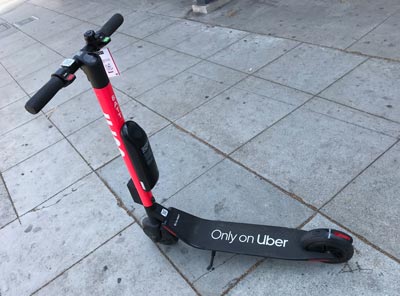
Uber Jump scooters are red, with Uber and Jump branding
How much do Uber scooters and E-bikes cost?
Uber Jump scooters and bikes cost $1 to unlock and $0.15 – $0.30 per minute (prices vary city to city). If you end your ride outside of the designated service area, there is a $25 fee. The maximum rental period is 24 hours.
Uber promo code for scooters & bikes: Use code cws7s2 to get a discount on your first ride. I may receive a bonus from Uber if you use my code.
Where are Uber scooters & bicycles available?
Uber scooters are available in Atlanta, Austin, Baltimore, Chicago, Dallas, Los Angeles, Miami, Nashville, Sacramento, San Diego, Santa Monica, Tampa, and Washington D.C.
Uber bicycles are available in Atlanta, Austin, Denver, Los Angeles, New York, Providence RI, Sacramento, San Diego, San Francisco, Santa Cruz, Seattle, Santa Monica, and Washington D.C.
Requirements to use rent Uber scooters & e-bikes
- Must be 18 years or older
- Must have a valid driver’s license or state ID – The app requires you to take a picture of it before you start
- Begin and end your rental within the service area outlined in the Uber app. $25 fee if you leave the scooter outside of the service area
- Obey all local laws
- Don’t block sidewalks or driveways when you drop off the scooter
- Maximum rental period is 24 hours
How to rent and ride an Uber Jump scooter or bike
Here are the 5 steps to using an Uber scooter or bicycle:
- Open the Uber app and select the Bike & Scooter mode
- Find a scooter or bicycle inside the service area
- Scan the barcode on the scooter handlebars
- Ride the scooter. Accelerate on the right handlebar, brake on the left
- Park the scooter inside the service area, tap End Ride, take a photo of the scooter
Step 1 & 2. Toggle Bike & Scooter mode find an Uber scooter in the service area
Open the Uber app and tap the button at the center top of the screen. Select Bike & Scooter to enable the Bike & Scooter rental mode. A service area outline will appear on the map, along with icons that indicate nearby Scooters and Bikes.
You can only rent scooters or bicycles within the service area. You can ride out of the service area during your rental, but you must end the rental within the service area to avoid a $25 fee.
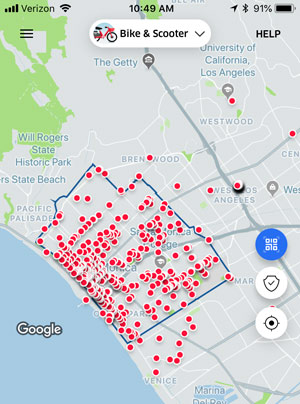
Your rental must begin and end in the service area
3. Activate the scooter or bike by scanning the barcode on the handlebars
Find a scooter or bicycle on the map, walk up to it, and tap the Scan icon. Point your phone camera at the barcode in the center of the scooter handlebars. For bicycles, the barcode may be on the back of the bicycle, or near the handlebars. You will then be asked to agree to a Terms of Service, and scan your driver’s license or state ID to confirm that you’re 18.
4. How to ride an Uber Jump scooter
When you’re ready to start riding, tap the Begin Ride button. Getting the scooter going is simple: Point it in a safe direction, kick start a few times to get momentum, then press the accelerator button on the right handlebar to power the scooter. Slow down and stop using hte brake button on the left.
Jump scooters similar scooters and Bird and Lime. The top speed is close to 15 mph and the range is around 15 miles.
4a. How to ride an Uber Jump e-bicycle
When you’re ready to start riding, tap the Begin Ride button. Jump e-bikes are electronically-assisted pedal bikes, so you pedal the bicycle as normal and an electronic motor adds extra boost as you pedal. Brakes are located on the handlebars, and Uber recommends using both at the same time to adequately slow the bike.
The bicycles also have a rotating switch on the handlebars that allow you to choose between three levels of pedaling difficulty, labeled 1-3. Use 1 to make it easier to pedal uphill, and use 2 or 3 when on you want to go faster on flatter terrain.

Jump e-bikes in Los Angeles
5. Park and end your rental
To end your rental, find a good public location within the service area to park the scooter or bicycle. Look out for ‘No parking’ zones marked inside the app.
Try to park it near a bike rack, or near an intersection in a location that doesn’t block the sidewalk. Do not park the scooter on private property.
Once you park, kick down the kick stand and tap End Ride. The app will then make you take a photo of the scooter to show its parking spot, and that it isn’t damaged or in an incorrect parking location.

How does Uber Scooter compare to Bird, Lime, and Lyft Scooter?
Uber scooter, Lyft scooter, Bird, and Lime all offer a nearly identical service. Are there any real, substantial differences? The cost of all the services isn’t just similar, it’s the same: $1 + $0.15 per minute. The scooters are all similar: Similar functionality, similar speed, and similar range. To the customer, there is almost no difference at all between the scooter companies.
Does Uber offer any advantages over the other? Not really, but Uber is likely to make a big impression in the market because millions of people already have the Uber app. Without any need to discover and download a new app, Uber users are just one step away from renting a scooter.
Thelma Sanchez says
We are a group of 6 people needing bikes or scooters for work in Cross City FL. We are near a walking trail. How can Uber help?
Cookie Rojas says
This information is out-of-date. E.g., in Baltimore Uber partners with Lime. A link to this page from the one below is under heading “Can you unlock two lime scooters?” The answer does not address the question. Follow up: can you unlock two Lime scooters via Uber app, or strictly via Lime app?
Nicolas Aguilar says
Why is that unlikely? I would think if you do enough deliveries threw out the whole day you’ll definitely have made your cash back and actually make a profit. Especially since you’ll be riding a scooter or E-Bike which I’m sure if faster than riding a regular bike.